
Best Gym Tracker App for Strength Training (2026)
A criteria-first guide to choosing the best gym tracker app for strength training, with a 2-workout test and clear decision rules.

Quick answer: the best gym tracker app for strength training is the one you can use between hard sets without losing your rhythm. It should make previous performance, next-set targets, and routine structure obvious in seconds.
Most lifters do not need more dashboards. They need fast logging, repeatable templates, and workout history clear enough to support progressive overload week after week.
Updated Mar 28, 2026: adds a practical checklist for comparing gym trackers, strength training trackers, and lifting-focused workout apps.
If you want the broader category first, start with Best Workout App. If you already know you want a logging-first system, compare this with Strength Training Tracker.
What makes the best gym tracker app for strength training?
- Logging speed: sets, reps, and load should take seconds, not menu-hopping.
- Template flexibility: PPL, upper/lower, and custom splits should stay easy to repeat and edit.
- History clarity:last-session performance should be visible before you guess at today's target.
- Overload support: the app should help you decide whether to add reps, load, or keep the plan steady.
- Optional watch flow: Apple Watch support matters when it makes execution faster, not when it adds another layer of friction.
If a tracker misses two or more of these, it usually turns into a notes replacement with a prettier UI, not a better training system.
Quick comparison table
| Criterion | What to look for | Why it matters |
|---|---|---|
| Between-set speed | Can you log a normal work set in under 10 seconds? | Slow logging gets skipped first when sets get hard. |
| Template fit | Can you run your actual split without awkward workarounds? | A tracker only works if it matches the routine you repeat each week. |
| Previous performance | Are last-session reps and load obvious before the next set? | That context is the core signal for progressive overload. |
| Workout review | Can you review a lift trend in under a minute? | Weekly review is what turns logs into better training decisions. |
| Device workflow | If it has Apple Watch support, does it genuinely reduce friction? | Extra device support only matters when it improves session flow. |
Quick picks by training style
- Best for progression-focused lifters: Push/Pull, if you want fast logging plus a cleaner overload workflow.
- Best for minimalist manual tracking: the tracker that shows previous values clearly without overbuilt dashboards.
- Best for Apple Watch lifters: the workflow that keeps the current set obvious on your wrist and the weekly review clearer on your phone.
- Best for PPL or upper/lower templates: the app that handles repeatable day-types and quick swaps without losing history.
If you want the progression-heavy angle, continue with Best Progressive Overload Apps for Strength Training.
The 2-workout gym tracker app test
- Use one normal upper-body or push workout and one lower-body or pull workout.
- Create or edit your template before training and note how long setup takes.
- Log every work set in real time instead of backfilling later.
- Find last week's performance for one main lift before your top set.
- Swap one exercise mid-session and see whether the routine stays clean.
- After both workouts, decide whether the next target is obvious without extra math.
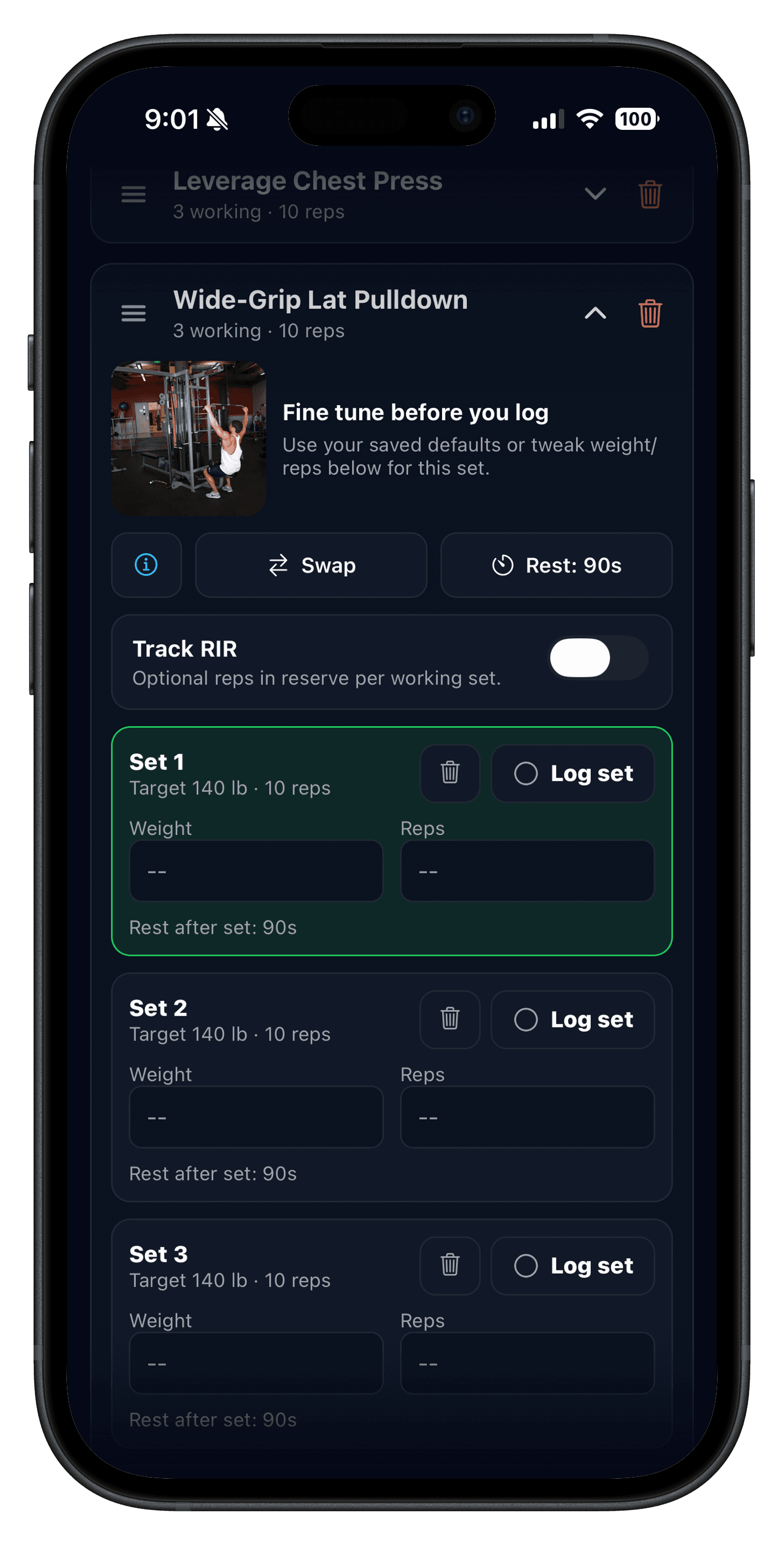
Best gym tracker app vs generic workout app
| Need | Generic workout app | Strength-focused gym tracker |
|---|---|---|
| Previous-set context | Sometimes buried behind workout summaries or notes. | Visible during the session when load decisions actually happen. |
| Repeatable splits | Often optimized for variety, classes, or one-off plans. | Built for templates you can repeat across weeks with small edits. |
| Progressive overload review | Possible, but often less clear for barbell or dumbbell progression. | History is organized around lifts, routines, and trend review. |
| Gym-session speed | May favor plan browsing over fast logging. | Keeps taps low so sessions still feel like training, not admin. |
If your bottleneck is pure logging flow, compare this page with Workout Logging and Workout Log: Track Sets, Reps, and Weight.
What matters most for progressive overload tracking
A gym tracker app only helps strength progress if it supports better decisions, not just better storage. That means the app should make three things easy:
- Seeing your previous performance before the next work set.
- Reviewing one lift trend each week without exporting data anywhere else.
- Adjusting reps, load, or volume without rebuilding the whole routine.
For a deeper comparison, read Best Progressive Overload Apps and Progressive Overload Explained.
Who this is for
- Lifters replacing notes or spreadsheets with a lower-friction system.
- People comparing gym tracker apps before committing to a new workflow.
- PPL, upper/lower, and custom-split users who want repeatable templates.
- iPhone and Apple Watch lifters who want faster logging with clearer progression review.
If watch-first training matters to you, pair this with Best Apple Watch Strength Training App.
FAQ
What is the best gym tracker app for strength training?
How do I know if a gym tracker app will actually stick?
Should a gym tracker app show previous workout data during the session?
Is Apple Watch support important in a gym tracker app?
Do I need a workout planner app or a gym tracker app?
Can a gym tracker app help with progressive overload?
Related reading
- JEFIT Alternative: Push/Pull vs JEFIT
- Caliber Alternative: Push/Pull vs Caliber
- Strength Training Tracker
- Workout Logging
- Best Workout Tracker App
- Workout Log: Track Sets, Reps, and Weight Without Overthinking
- Best Progressive Overload Apps for Strength Training
- Best Apple Watch Strength Training App for Lifters
Test your next week with a cleaner gym tracker
Push/Pull is built for lifters who want fast logging, repeatable templates, previous-set context, and clearer progression decisions without a cluttered workflow.