
Track Sets, Reps, and Weight: A Simple Workout Log App Guide
A practical guide to tracking sets, reps, and weight in a workout log app, with a direct-answer checklist, notes-vs-app comparison, and a 2-minute weekly review.
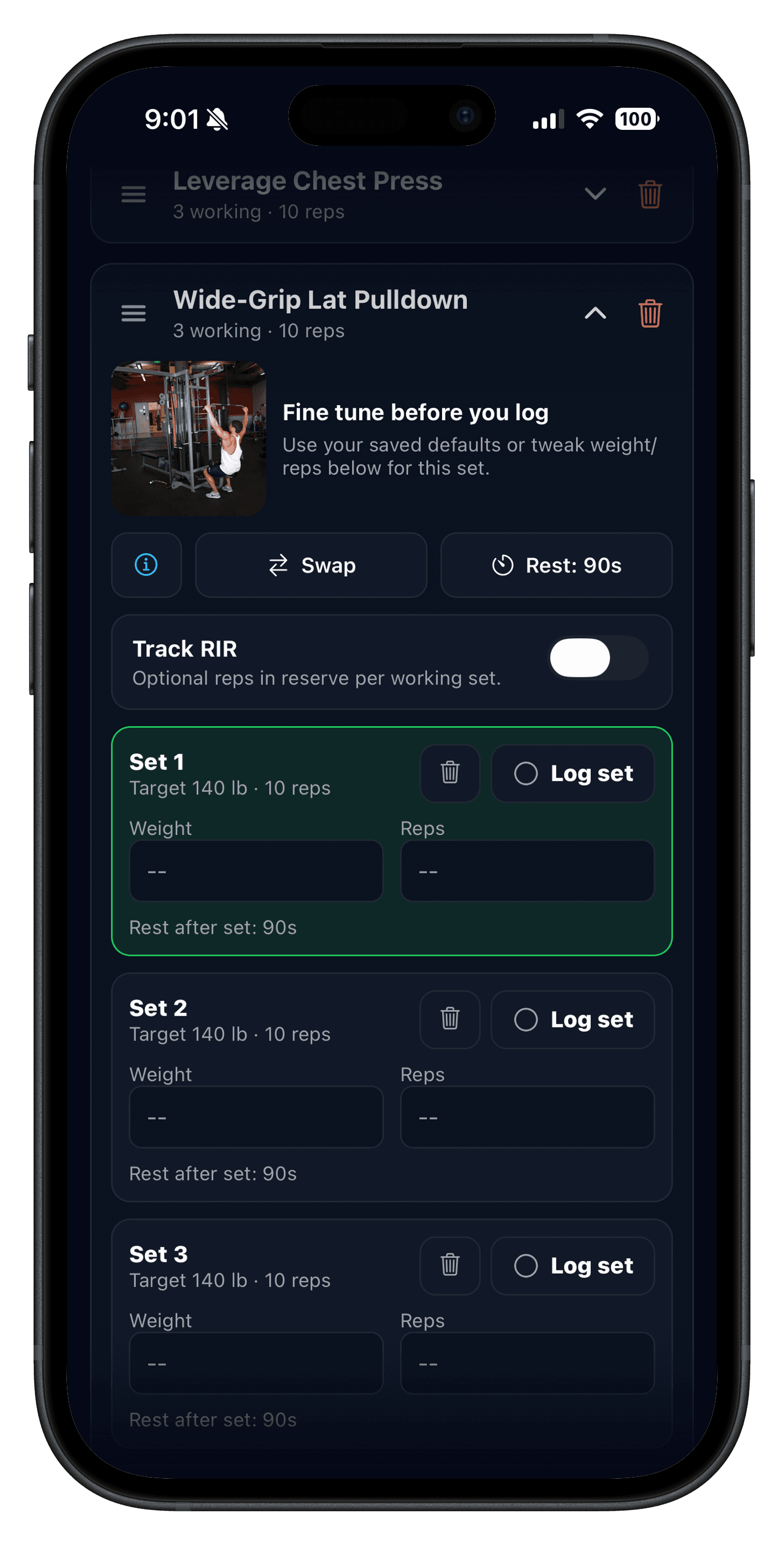
Quick answer: to track sets, reps, and weight in a workout app, save one repeatable template, log working sets during a normal rest period, keep previous workout values visible before the next hard set, and review progress in a couple of minutes each week.
If you are comparing a workout log app, gym log app, or an app to track weight lifting, the job is the same: fast logging, clear history, and a next-session target you can trust.
Most lifters only need exercise, sets, reps, weight, and a repeatable template. The right app keeps that loop simple instead of turning training into admin.
Updated May 29, 2026: adds clearer guidance for how to track sets, reps, and weight, compare workout logs, and keep previous performance visible during a session.
If you want the product workflow behind this guide, compare Workout Logging, Previous Workout Values, Strength Training Tracker, and Strength Training Log App.
The best workout log app is the one that keeps set entry quick, shows your last workout before the next hard set, and makes it obvious whether to add reps, add load, or hold steady next week.
In practice, that usually means fast set logging, previous workout values, and a clean template flow that does not break when real gym decisions happen mid-session.
A workout log app is a tool that records exercises, sets, reps, and weight so you can repeat workouts, compare performance, and make progression decisions quickly.
In practice, most lifters use workout log app, gym log app, and workout tracker app to mean roughly the same thing. The useful distinction is not the label. It is whether the app keeps set logging fast and your history easy to use when the next session starts.
How to track sets, reps, and weight in a workout app
If you want the simplest system that still supports progression, keep the workflow narrow: save the workout, log working sets, compare with last time, and review once per week.
- Save one template you can repeat without rebuilding the workout each session.
- Log each working set with reps and weight during your normal rest period.
- Check your previous values before the next hard set so progression stays obvious.
- Review one or two lifts each week and decide whether to add reps, add load, or hold steady.
That is enough for most lifters. You do not need extra fields unless they help you make a better decision next session.
What makes the best workout log app?
- Fast logging: you can finish a set entry during a normal rest period.
- Previous values: last session performance is visible without extra taps.
- Repeatable templates: your normal workouts are easy to reuse and edit.
- Clean history: reviewing a lift or routine takes seconds, not digging.
Useful extras only matter after the basics work. Push/Pull's Plate Load Helper is a good example: it speeds up barbell setup, but it only matters because the core logging flow is already fast.
- Save one routine you actually run each week.
- Log 3-5 exercises during your normal rest periods.
- Check whether previous values are visible before the next work set.
- Find the session again and choose the next target in under 30 seconds.
If an app fails any of those four tests, it usually becomes another abandoned tool. For a broader buying checklist, read Best Workout Tracker App.
What should a workout log app track beyond sets, reps, and weight?
Your log should be minimal enough to use every session. If it takes longer to log than it does to recover, the system is too complicated.
- Exercise name
- Working sets
- Reps per set
- Weight used
Optional fields like rest time, RIR, RPE, and quick notes are useful when they improve decision-making. They are not useful when they slow you down or create extra noise.
| Track every session | Add when useful | Skip unless it changes a decision |
|---|---|---|
| Exercise, working sets, reps, and weight | Rest timer, RIR/RPE, one-line notes, and warm-up sets for heavy lifts | Extra detail that slows down the set you are about to log |
That is why most people trying to track weight lifting on their phone do better with a simple log than a feature-heavy setup. The best system is usually the one you can still use when you are short on time or halfway through a hard top set.
If you want a plan to plug this system into, start with Workout Template: Build a Simple Strength Plan.
Workout log app vs notes vs spreadsheet
Most lifters are choosing between three systems. The best one is the one that stays fast in the gym and clear when you review it later.
| System | Best part | Main problem | Best for |
|---|---|---|---|
| Notes | Quick and simple | History gets messy fast | Short-term casual tracking |
| Spreadsheet | Custom structure | Too much friction between sets | People who enjoy manual setup |
| Workout log app | Fast logging plus usable history | Needs a good template flow | Most strength-focused lifters |
If you want a system built around low-friction logging instead of manual cleanup, the workout logging workflow and fast set logging page show what good in-app execution looks like.
The simplest progression rule you can follow
When you hit the top of your rep range for all sets twice in a row, increase weight by 2.5-5 lb.
Example: If your goal is 3 sets of 6-8 reps and you hit 8, 8, 8 two workouts in a row, add a small amount of weight next time.
For a deeper breakdown on how to progress without guessing, read Progressive Overload Explained.
Example: a 2-week workout log progression
Use the same exercises, then nudge reps or weight in small steps. Here is a simple example for bench press:
- Week 1, Session A: Bench Press - 3x6 @ 135 lb
- Week 1, Session B: Bench Press - 3x7 @ 135 lb
- Week 2, Session A: Bench Press - 3x8 @ 135 lb
- Week 2, Session B: Bench Press - 3x6 @ 140 lb
You could apply the same idea to squats, rows, or any accessory exercise. The point is consistency, not constant maxing out.
How to review your workout log in 2 minutes
- Pick one main lift and one accessory lift.
- Compare this week with last week.
- Decide whether to add reps, add load, or hold steady.
- Leave everything else alone unless recovery is clearly poor.
That review loop is what turns a log into a training tool. If you want more structure around weekly analysis, the strength training tracker page shows how progress review fits into the broader product.
Who this guide is for
- Lifters moving from notes to a cleaner, repeatable workout history.
- Beginners who want early progress to stay visible instead of relying on memory.
- Intermediate trainees who need previous values and small load jumps to stay consistent.
- Anyone choosing between a general fitness app and a strength-focused logging tool.
Should you log warm-up sets and RPE?
RIR (reps in reserve) tells you how many reps you could have done before failure. RPE (rating of perceived exertion) flips it into a 1-10 effort score. They are two ways of describing the same intensity signal.
Track RIR or RPE if you lift near failure, autoregulate often, or want effort to stay more consistent across weeks. If you are new, sets, reps, and weight are usually enough at first.
Warm-up sets are similar: log them when you want a repeatable ramp on heavier lifts, but keep them optional if they clutter your workflow. Use Warm-Up Sets and RIR and RPE Explained if you want the deeper decision rules.
Workout log FAQ
What is the best workout log app for strength training?
What should a workout log app track?
How do I track sets, reps, and weight in a workout app?
What makes a good workout log app?
Is a workout log app the same as a gym log app?
Is a workout log app better than notes or a spreadsheet?
Do I need to log warm-up sets in a workout log app?
How often should I review my workout log?
How do I track weight lifting workouts on my phone?
Is a workout log app necessary for beginners?
Related reading
- Strength Training Log App: What to Track for Real Progress
- Best Gym Tracker App for Strength Training
- Best Workout Tracker App: Checklist for Faster, Consistent Progress
- Weightlifting Tracker App: How to Pick One You Will Actually Use
- Not Logging Workouts Costs You Gains
Ready to log your next session?
Push/Pull is a fast workout log app for iPhone with repeatable templates, previous-set context, and clear history built for progression. Keep the log simple and let the next few weeks compound.