
Workout Recovery App for Strength Training: What Lifters Should Actually Track
A practical guide to choosing a workout recovery app for lifting, with clear criteria for readiness, fatigue trends, and rest-day decisions.

Quick answer: a workout recovery app only helps lifters if it connects recovery signals to the workouts they actually do. For strength training, muscle-specific fatigue, recent volume, and a clear train-or-modify decision matter more than a generic readiness number.
That is the gap with most recovery tools. They can tell you that you feel run down, but not which muscles are lagging, what workload caused it, or whether your planned session still makes sense.
If you only want a manual check before training, start with Workout Recovery: Should You Train Today?. If you want a strength-focused system that pairs recovery with workout history, see the strength training tracker.
- Choose a recovery app that reads recent training load and points to a clear next action.
- Choose Push/Pull if you want readiness to live next to your workout log, templates, and progression decisions.
- Skip recovery metrics for now if you are not logging workouts consistently yet.
What makes a good workout recovery app?
- Training-aware recovery: it should use recent workload, not just a vague energy score.
- Muscle-level context: you should see which muscle groups are ready, not just whether your whole body feels good or bad.
- Actionable guidance: the app should help you decide whether to train as planned, reduce volume, or take a rest day.
- Linked workout history: recovery only makes sense when it sits next to your logged sets, reps, and previous sessions.
Rule of thumb: if a recovery app cannot show what training load created the fatigue signal, it is probably too generic for consistent lifting.
Which kind of recovery tool actually helps in the gym?
| Tool type | Best for | Main limitation |
|---|---|---|
| Generic wellness or recovery app | Broad sleep, stress, or energy context. | Usually too detached from your actual lifts and muscle groups. |
| Notes or spreadsheet | Cheap manual tracking if you already know what to look for. | No automatic readiness signal, fatigue trend, or quick rest-day prompt. |
| Strength-focused recovery app like Push/Pull | Lifters who want readiness tied to workout history and planned training. | Works best when you already log sessions consistently. |
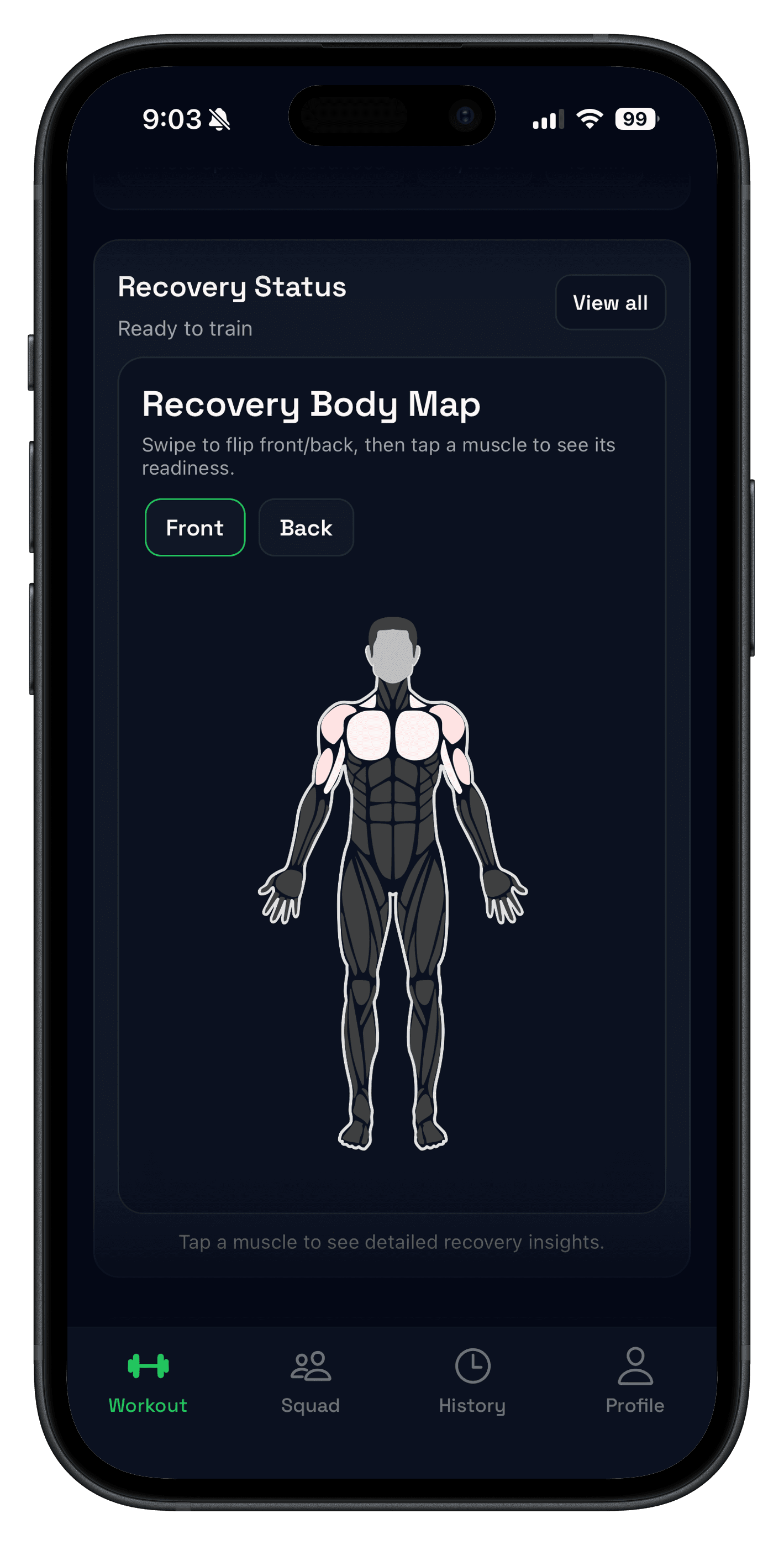
How Push/Pull handles workout recovery and readiness
Push/Pull uses the same workout history you already log to make recovery signals more specific. Instead of giving one opaque score, it surfaces several cues that are easier to act on mid-week.
- Recovery Body Map shows which muscle groups are fresh or fatigued on a front and back body view.
- Muscle Readiness Score turns recent volume, baseline load, and time since training into a clearer push-or-back-off signal.
- Fatigue Trends helps you spot whether a hard week is accumulating faster than you planned.
- Rest-day prompts add a sanity check when fatigue stays high across the same muscle groups.
That makes the tool more useful for lifters running repeatable templates, where the real question is not whether you are tired, but whether this session is still the right session today.
Who should use a workout recovery app?
- Lifters training four to six days per week who need better signal on whether a muscle group is ready again.
- People who already log workouts and want clearer decisions instead of more raw data.
- Anyone who tends to push through fatigue until progress stalls, then wonders why a plateau showed up.
If that sounds familiar, pair recovery signals with a clean logging system like Workout Log App for Strength Training: Track Sets, Reps, and Weight Fast and review recurring slowdowns with How to Break a Strength Plateau.
How to use a workout recovery app without overthinking it
- Log the workout accurately so the recovery signal has real context.
- Check readiness before you start, especially for the muscles you plan to hit.
- If recovery is lagging, reduce volume or swap the session instead of forcing the original plan.
- Review fatigue trends once per week to see whether the block is still sustainable.
Most people do not need to stare at recovery data all day. They need a quick check before training and a weekly look to make sure load, frequency, and fatigue are still aligned.
What a workout recovery app should not replace
A recovery app is not a substitute for sleep, food, sane volume, or injury judgment. It works best as a training-context layer on top of those basics, not as a magic readiness oracle.
The best use case is catching fatigue accumulation early so you can adjust before a whole week unravels. That is especially useful when progressive overload starts to stall or warm-up sets feel heavier for the wrong reasons.
FAQ
What is a workout recovery app?
Is a workout recovery app better than a wearable readiness score?
What should a workout readiness app track for lifters?
Can a recovery app tell you when to take a rest day?
Do beginners need a workout recovery app?
Turn recovery into a clearer training decision
Recovery is most useful when it helps you adjust the next session, not when it adds one more dashboard to ignore. If you want recovery signals tied to real workout history, Push/Pull is built for that strength training job.